

Workflow Debugger
Read this when a run is stuck, took the wrong branch, or you need to step through a live graph. Companion to the Workflows and Task Graphs Guide (what a workflow is) and packages/TaskGraph/README.md (how the engine runs it).
The typical path is Agent form → Run → Debug. That starts the Flow agent paused — $.debug.paused is written on the parent row at Submit, so the dispatcher cannot claim the first step before you arrive. Workflows → Runs is the review console for a graph that is already going (or already finished). You cannot re-run a Flow agent from Runs; open the agent and Debug again.
Both surfaces embed the same drop-in: <mj-task-graph-debugger> in @memberjunction/ng-task-graph-editor. Hosts pass a parent task id. The wrap owns frames, $.debug, and every TaskGraph.* Remote Operation.
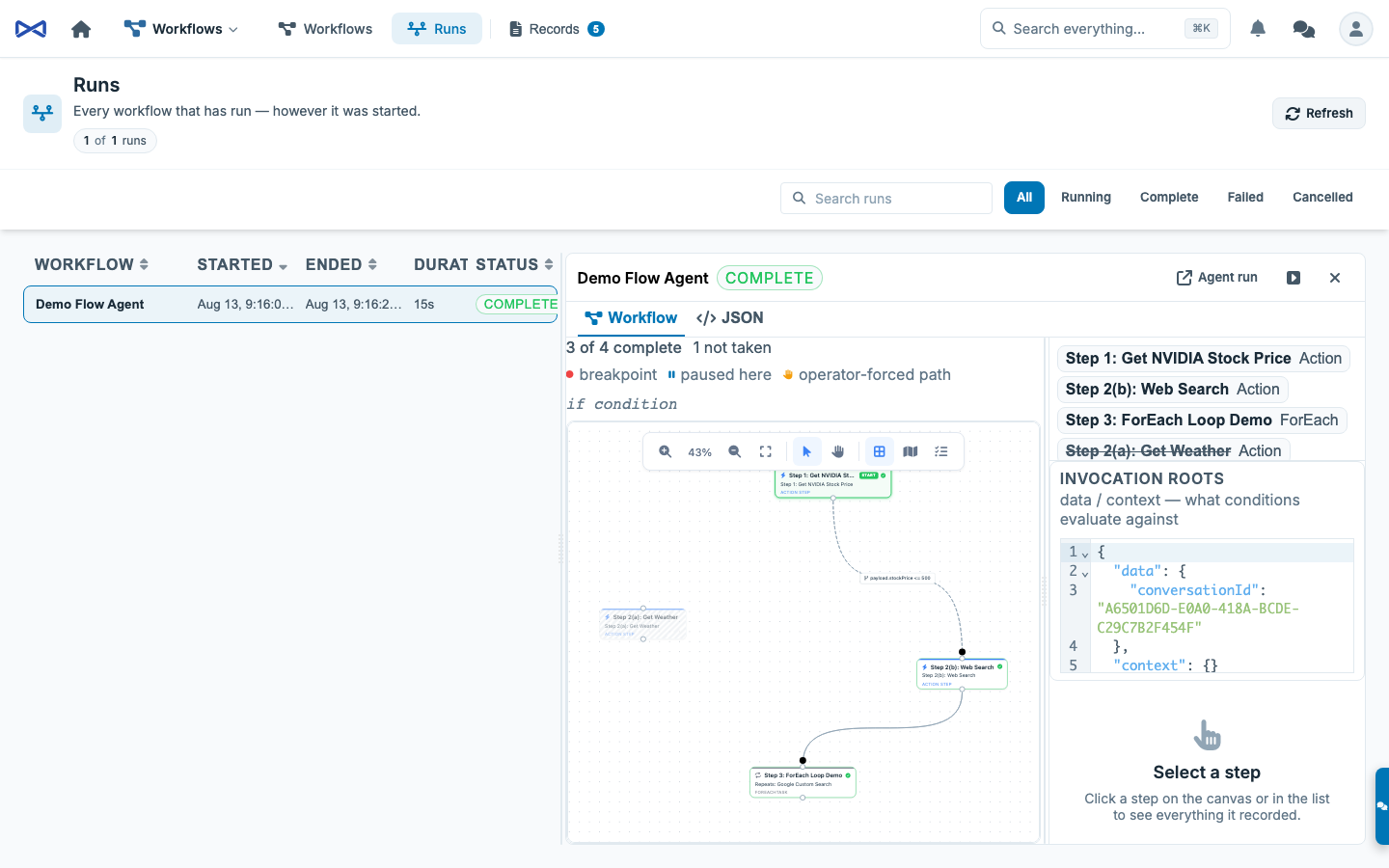
What you are looking at
Section titled “What you are looking at”A parent MJ: Tasks row is a run. Open it and the pane is the console:
| Piece | What it is |
|---|---|
| Data pane (left) | Invocation data / context plus the selected step’s input and output. Starts minimized (a thin rail). Expand, drag the splitter, collapse again — width is restored. Persisted as one typed bag (TaskGraphRunPrefs, key mj.taskGraphRun.prefs.v1). |
| Canvas | The graph, live. Untaken branches disappear. A taken path is thicker and success-green. The edge about to run (or currently running) is brand-colored, thicker, and animated. |
| Runner controls | Continue (F5) / Step Over (F10) / Step Into (F11) / Stop (Shift+F5). These gate claiming, not running. In-flight work finishes. When every step is done the bar shows Finished, not Paused — settled state trumps a leftover $.debug.paused on the row. |
| Canvas tools | Minimized by default (wrench chip, top left). Expand for zoom / pan / fit. Hide leaves a recover tab. Fit-to-view runs once per geometry, not on every poll. |
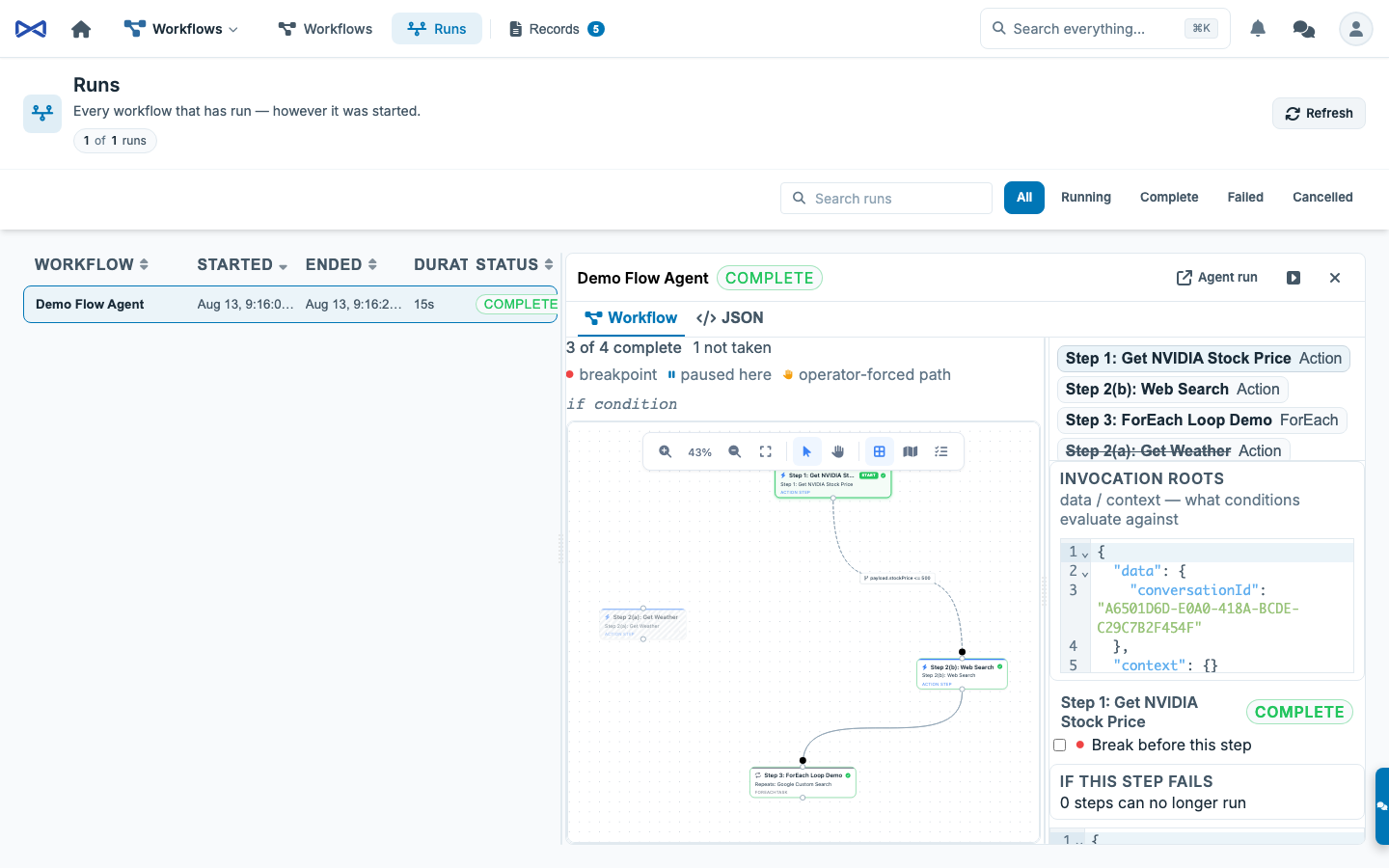
| Breakpoint | Red circle on the selected step (hollow = off, filled = on). Same badge on the node. Right-click Add / Remove Breakpoint (F9). IDs are compared with UUIDsEqual so a case-folded UUID still matches. |
| Stall card | A held path names the condition and offers Answer true / Answer false / Leave held. |
| Inspector | The selected step or edge. Break-before-this-step, skip, edit input, retry, force complete. |
The same wrap embeds in the agent-run timeline (chrome off — that surface is a recording) and in the test harness (chrome on when you clicked Debug). Starting Payload in the harness is a collapsed disclosure, default closed, hidden while a run or debug session is live (mj.aiTestHarness.prefs.v1).
How to debug from the Agent form
Section titled “How to debug from the Agent form”- Open the Flow agent. Click Run.
- Click Debug, not Run workflow. The live graph appears under the buttons as soon as Submit lands — do not wait for the agent run to finish (it is parked until the graph settles).
- Run workflow / Debug hide once the debugger is live — the VCR is the session. Continue (F5) / Step Over (F10) / Step Into (F11) / Stop (Shift+F5).
- The first eligible step shows Next — waiting for the engine until the dispatcher claims it, then Running, then the next one. A breakpoint paints Waiting on you. Right-click a step to add or remove a breakpoint. Right-click a conditional edge to force the path.
- Close the dialog if you want — the dispatcher still owns the graph. Re-open Runs to find it later.
Start-paused cannot be a Pause clicked after submit. The first dispatcher pass would claim work first. Submit writes $.debug.paused on the parent row and kicks every running dispatcher so the first poll is immediate, not one PollIntervalSeconds later.
How to debug a live run already in flight
Section titled “How to debug a live run already in flight”- Open Workflows → Runs and select a running (or just-submitted) graph.
- Pause, or arm a breakpoint on the interesting step (red circle after selecting the node, or right-click) and Continue.
- When the graph stops, the paused-here badge and chip name the step. Open the left pane to inspect its input. Edit it if the brief is wrong, then Step.
- If the stall card says a path can’t be answered, that is a held exclusive group. Answer the condition or fix the invocation roots and resume.
- Continue to run freely to the next breakpoint, or Step / Step wave to walk.
A breakpoint pauses the whole graph before the named step is claimed. Siblings do not start. That is what “pause here” means on a parallel graph.
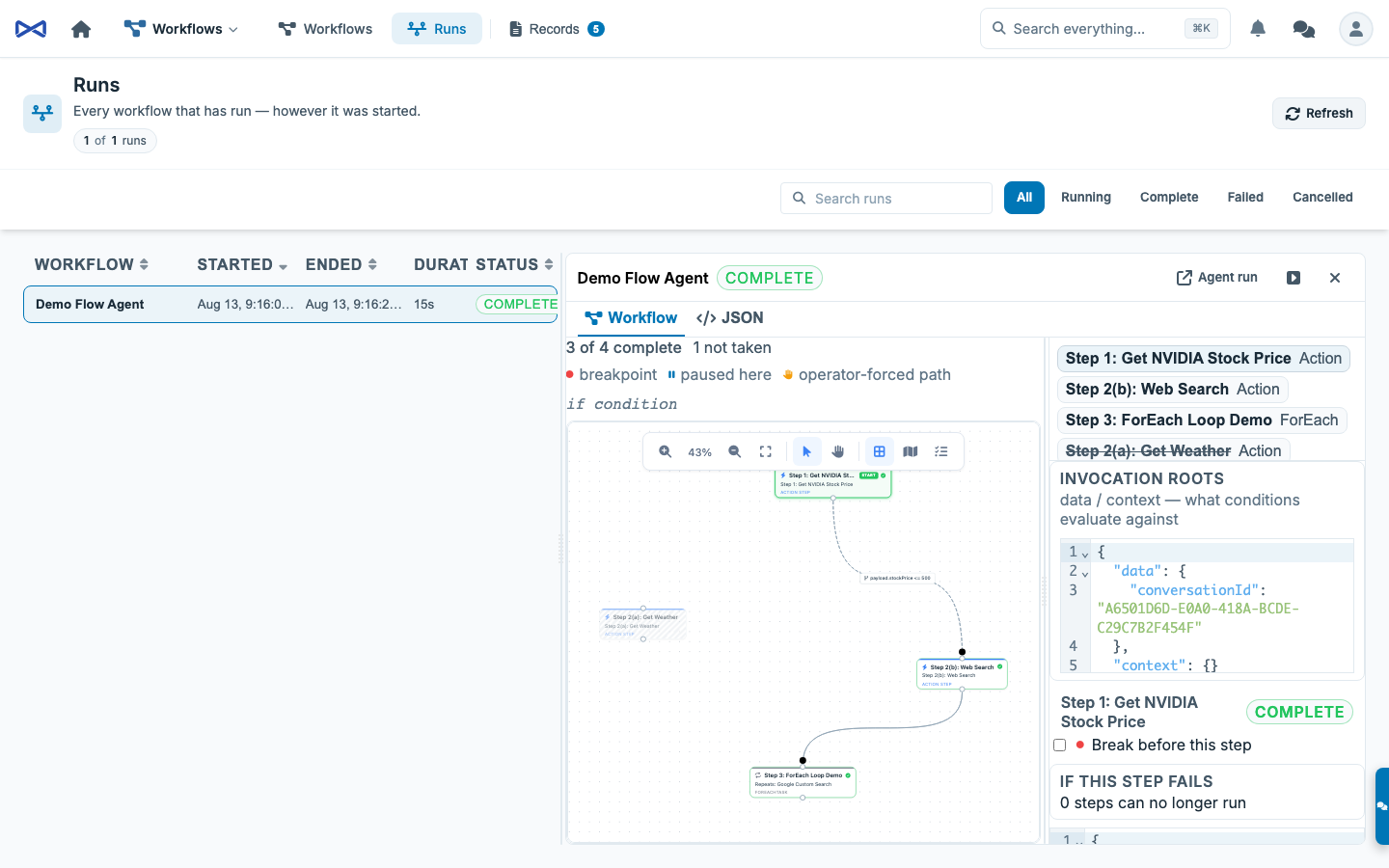
How to read the picture
Section titled “How to read the picture”| Look | Meaning |
|---|---|
| Next — waiting for the engine (dashed brand glow) | Prerequisites are done (or it is an entry). The dispatcher has not claimed it yet. Distinct from a breakpoint. |
| Running (solid pulse) | Claimed. The runner is in flight. |
| Waiting on you (pause badge) | Breakpoint hit, or start-paused on the first step. Continue or Step to release. |
| Grey / skipped | The graph chose another route. Normal. Not a failure. |
Untaken branches are gone from the picture (except an operator-forced edge, which must stay visible or the history lies).
| Stroke | Meaning |
|---|---|
| Thin, default color | Not yet traveled. A conditional still waiting on a decision is dashed and keeps its if / expression label. |
| Thick, success-green, solid | Traveled — the origin finished and the destination actually started (In Progress / Complete / Failed / Cancelled). A pending destination is still a candidate, so the edge stays dashed until one dest is claimed and the losers skip. |
| Thick, brand-colored, animated | Flowing — the dest is next-to-run or currently running. |
| Dotted + hand + “forced yes/no” | You answered this path. Never looks like a condition that evaluated on its own. |
A conditional that has been taken becomes solid and keeps the if label. The dash is “not decided yet,” not “this edge has a condition.”
State is read from $.debug on the parent row, not accumulated from frames. Refresh the page and the armed set is still there. Frames (BreakpointHit, GateDecision, GraphSettled, …) are how the console learns quickly; the row is how it stays honest.
Continue, ForEach, and why one breakpoint is not five
Section titled “Continue, ForEach, and why one breakpoint is not five”ForEach is one task row. Iterations run inside that one claim. Continue does not mean “run one iteration” — it means “claim this step (the whole loop) and then run freely to the next armed breakpoint on a different task.”
When you Continue from a breakpoint, Resume stamps skipBreakpointTaskID on the bag for the stopped step. The next claim gate ignores that id once so the Pending row is actually claimed. Without that, Resume would clear paused and the next poll would re-hit the same still-eligible breakpoint forever — which is exactly what a breakpoint on a last-step ForEach looked like.
The skip is cleared after the claim, or if the step is no longer eligible. Pause clears it too.
Why the first step used to wait a few seconds
Section titled “Why the first step used to wait a few seconds”The dispatcher polls on PollIntervalSeconds (default 5). Submit and the dispatcher are separate halves of the package — Submit cannot call the running instance directly. Each Start() registers a kick; TaskGraph.Submit calls KickTaskGraphDispatchers() so the first pass is immediate. Start() also kicks once so a dispatcher that just came up does not sit idle until its first interval.
If a graph sits on Next — waiting for the engine for several seconds after Debug, no dispatcher is registered to kick (MJAPI not running the worker, or StartTaskGraphDispatcher never ran).
The verbs the console calls
Section titled “The verbs the console calls”| Verb | When | What it does |
|---|---|---|
TaskGraph.SetBreakpoints | Any time | Replaces the breakpoint set. Empty array clears. The wrap re-reads immediately before composing so a stale write cannot drop someone else’s breakpoint. |
TaskGraph.OverrideEdge | A conditional edge | 'true' opens the gate, 'false' is branch-not-taken (skip cascade), null clears. Unconditional edges refuse — skip the step instead. |
TaskGraph.UpdateTaskInput | Step is Pending | Replaces this run’s input. Invalid JSON is refused in the UI. |
TaskGraph.RetryTask + inputPayload | Step is Failed | Edit the brief and re-queue. |
TaskGraph.ForceCompleteTask | Pending / Failed / Blocked, not a human step, not a live claim | Marks the step Complete. The RO field is payload — that value becomes the step output downstream conditions evaluate against. Typed confirmation required. |
TaskGraph.Pause / Resume / Step / Cancel / SkipTask | See toolbar | Already wired. Resume from a breakpoint also stamps skipBreakpointTaskID. |
Durable state
Section titled “Durable state”Everything lives under $.debug on the parent task’s InputPayload. The debugger and the dispatcher never talk directly — they rendezvous on the row. See debug-state.ts.
type TaskGraphDebugState = { paused?: boolean; pausedBy?: string | null; pausedReason?: 'user' | 'breakpoint'; pausedAtTaskID?: string | null; breakpoints?: string[]; step?: 'one' | 'wave' | string; skipBreakpointTaskID?: string | null; edgeOverrides?: Record<string, 'true' | 'false'>;};The empty object is “no debugging.” A graph submitted before this existed parses to exactly that.
Who can drive it
Section titled “Who can drive it”Debug verbs write through guarded SQL, so they authorize explicitly: the graph’s recorded owner, or an Owner-type user. Everyone else sees a clear refusal, not a silent no-op.
Two consoles on the same run share the row. SetBreakpoints replaces the whole set — if someone else armed one while you were looking, a stale write would drop theirs. The wrap re-reads immediately before composing.
Drop-in: embed the debugger anywhere
Section titled “Drop-in: embed the debugger anywhere”<mj-task-graph-debugger [ParentTaskID]="parentTaskId" [AllowBreakpointEditing]="true" [ShowChrome]="true" (Settled)="onSettled()" (Frame)="onFrame($event)"></mj-task-graph-debugger>Public verbs (Pause, Resume, Step, Cancel, ToggleBreakpoint, OverrideEdge, SkipTask, RetryTask, UpdateTaskInput, ForceCompleteTask) and editor events (NodeSelected, ConnectionSelected) are on the wrap. Hosts must not re-subscribe to TaskGraphFrames or call RouteOperation for the same session — that is how Runs and the harness used to drift.
The run view inside the wrap is still paint-only (L1). The wrap is an L2 composite whose job is the session, so it reads the parent row and writes via ProviderToUse.RouteOperation. See UI Layering §5.
Full API: packages/Angular/Generic/task-graph-editor/README.md.
What this is not
Section titled “What this is not”- Not a second canvas. The authoring canvas grew badges and a connection event;
flow-editorstays a generic graph editor. - Not cross-run breakpoint persistence. “Always break on this step of this workflow” is a design-time feature and a separate piece of work.
- Not a live channel to a worker. Every control is a row write. Every dispatcher instance obeys on the next pass (kicked immediately after Submit).
- Not “step one ForEach iteration.” The loop is one task. Step/Continue claims that row once.
Related
Section titled “Related”- Workflows and Task Graphs — definitions, conditions, failure, payload dialect.
packages/TaskGraph/README.md— dispatcher, claims, kick, remote operations.packages/TaskGraph/src/debug-state.ts— the durable state contract.@memberjunction/ng-task-graph-editor— canvas, run view, drop-in debugger.- UI Layering — L1 paint vs L2 session owner.